

What makes Ultra different
| Feature | Natural / NaturalHD | Ultra |
|---|---|---|
| Time to first byte | ~200–300ms | < 100ms |
| Expressive mode | — | Automatic emotional interpretation with SSML emotion tags |
| Nonverbal cues | — | [laughter] and other natural vocalizations |
| Languages | Varies by voice | 36 languages |
Voice format
Ultra voices use the format:Expressive mode for AI Assistants
When using Ultra voices with AI Assistants, you can enable expressive mode — a toggle that lets the AI model dynamically control the emotional delivery of speech during a live conversation.How it works
With expressive mode enabled, the assistant’s system prompt is automatically augmented with instructions for using SSML emotion tags. The AI model then decides — in real time — when and how to apply emotional expression based on the conversation context. For example, the assistant might:- Use an excited tone when delivering good news.
- Respond with empathy when a customer describes a problem.
- Insert
[laughter]for natural, friendly moments. - Speak neutrally for matter-of-fact information.
Demo
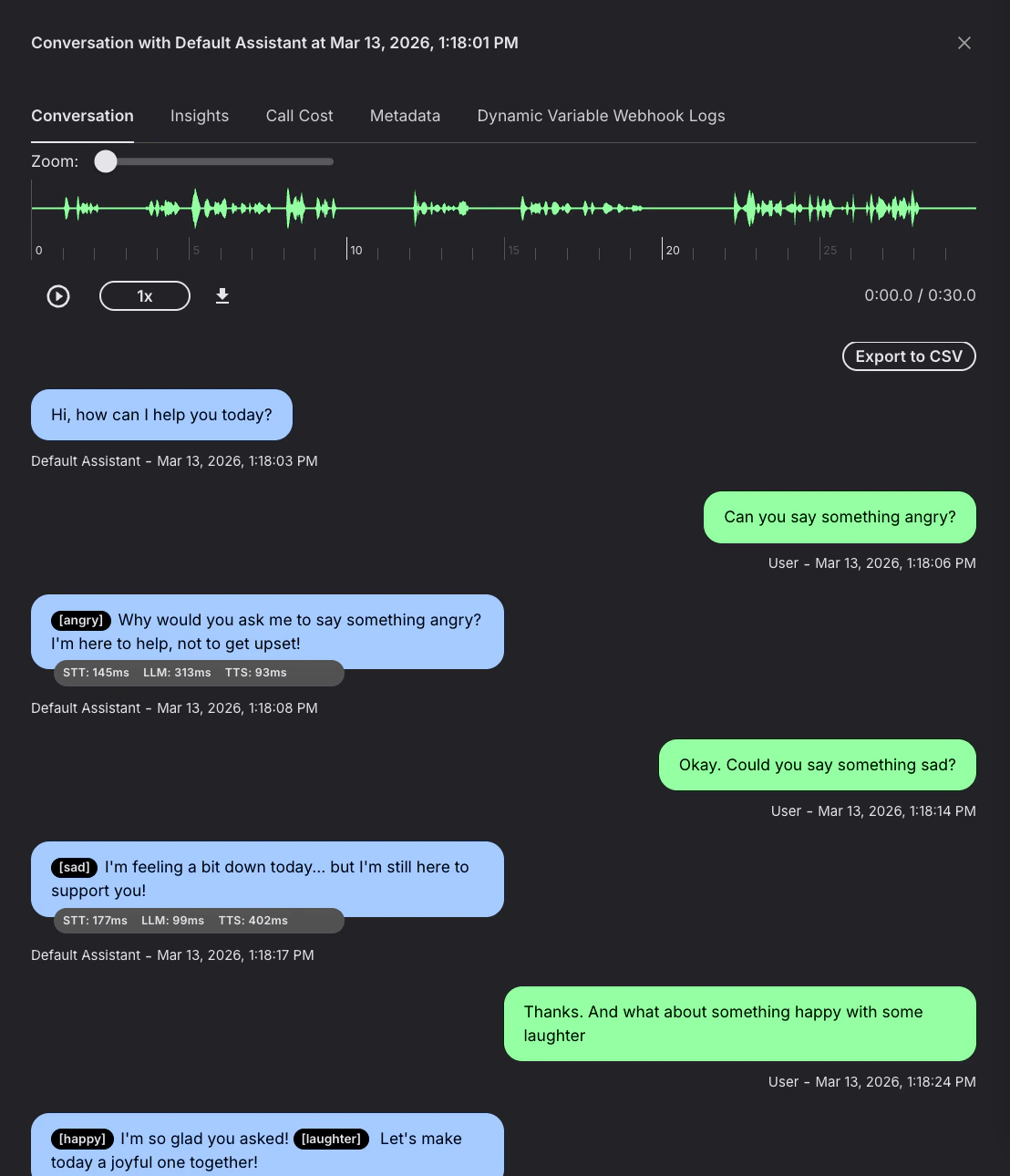
Here’s an example conversation with an Ultra voice assistant using expressive mode. Notice how the assistant automatically selects the appropriate emotion —[angry], [sad], [happy] — and uses [laughter] naturally, all without any explicit instructions in the prompt:
Enable in the portal
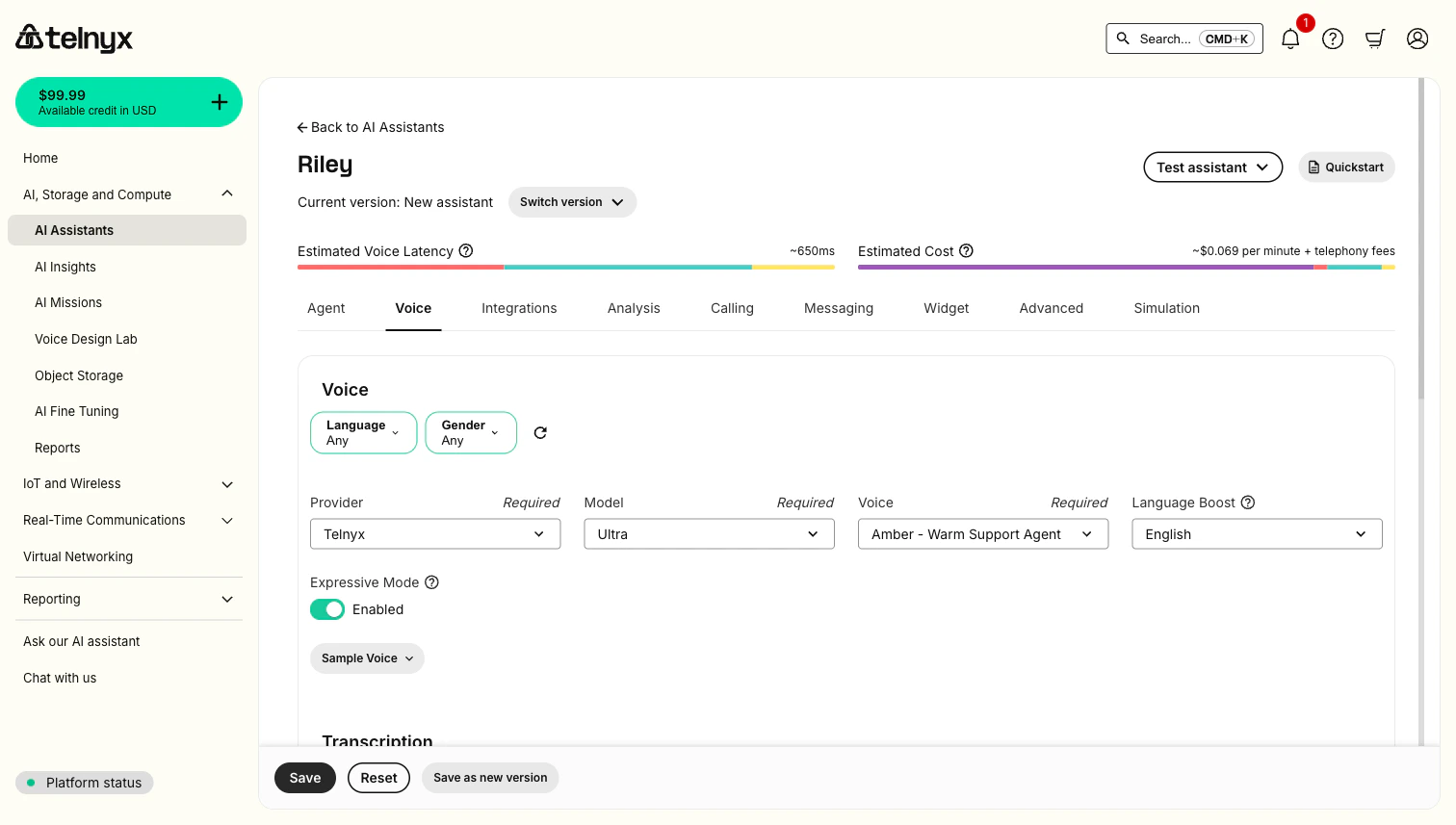
- Go to your assistant in the Telnyx Portal.
- Under Voice Settings, select a Telnyx Ultra voice.
- Toggle Expressive Mode on.
- Save your assistant.
Enable via API
Setexpressive_mode: true in your assistant’s voice_settings:
SSML emotion reference
When expressive mode is enabled, the assistant can use these SSML emotion tags in its responses. You can also use these tags with Ultra voices in Call Control speak commands.Format
Place an<emotion> tag before the text you want to affect:
Available emotions
Primary emotions (best quality):| Tag | Use for |
|---|---|
<emotion value="angry" /> | Firm, assertive delivery |
<emotion value="excited" /> | Energetic, enthusiastic responses |
<emotion value="content" /> | Calm, satisfied tone |
<emotion value="sad" /> | Empathetic, subdued delivery |
<emotion value="scared" /> | Anxious, worried tone |
happy, enthusiastic, curious, calm, grateful, affectionate, sarcastic, surprised, confident, hesitant, apologetic, determined, frustrated, disappointed, and more.
Nonverbalisms
Insert[laughter] directly in the text for natural laughing:
Language support
Ultra supports 36 languages via thelanguage_boost setting, which improves pronunciation accuracy for the target language:
Arabic, Bengali, Bulgarian, Chinese, Czech, Danish, Dutch, English, Finnish, French, German, Gujarati, Hebrew, Hindi, Indonesian, Italian, Japanese, Korean, Malay, Marathi, Māori, Norwegian, Polish, Portuguese, Punjabi, Romanian, Russian, Slovak, Spanish, Swedish, Tamil, Telugu, Thai, Turkish, Ukrainian, and Vietnamese.
Set language_boost in your assistant’s voice settings to improve pronunciation for the target language.
Next steps
Available Voices
Browse Ultra voices and filter by language and gender.
Voice Design Lab
Design custom voices from natural language prompts.
AI Assistants
Build voice AI assistants using Ultra with expressive mode.
Call Control TTS
Use Ultra voices with Call Control speak commands.
TTS WebSocket Streaming
Stream text to the TTS API and receive audio in real time.